My 2026 Note-Taking Workflow
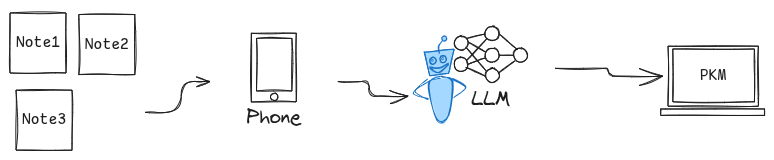
I think about note-taking more than I probably should. I’m thinking about it right now, actually. 😅
It started as a way to understand myself better — to track how my mind worked, what I cared about, where I was going. Somewhere along the way, it became a time machine. I can look back six months, a year, and see myself thinking. Sometimes I cringe at what I wrote. Sometimes I surprise myself with wisdom I’ve since forgotten.
I didn’t expect any of this. I didn’t sit down and design a workflow. It just… happened.
In January, I bought a pack of blank little square papers. Non-sticky, white, nothing fancy. I thought I’d use them for doodling. Like during meetings while half-listening 😁 .
But then a grocery list ended up on one. And some todo items on another. And before long, I was sketching diagrams, mapping out project architectures, jotting down random thoughts across these small white pages.
They kind of took over.
Now I keep three or four squares spread across my desk, each holding a different topic. When something comes to mind, I jump to the right one, write it down, move on. One square for project ideas. Another for a blog draft. A third for whatever’s rattling around.
The square format forces me to be concise — there’s only so much space. And having multiple squares open means I can switch contexts without losing the thread.
It’s simple. It shouldn’t work this well. But it does.
At the end of each day, I go through my squares one by one. It feels like viewing old photographs — each one a small window into what I was thinking earlier.
I regroup similar topics. If something needs more, I flip the square over and keep writing on the back. Tasks get marked done. And when a square is fully processed — completed, digitized, no longer needed — I scrunch it up and drop it in a transparent jar.
The jar idea came from Laurie Herault’s article about sticky notes and feedback loops. There’s something satisfying about watching thoughts become artifacts. The jar fills up. I see how much I’ve processed. It’s a small thing, but it matters.
Google Gemini digitizes my handwritten notes. It’s free, it’s capable, and the process is simple:
Photo. Send. Get text.
Analog becomes digital. Messy becomes searchable. Most of the time, that digitized text ends up in Logseq — where it connects to everything else.
I’m also testing other models on OpenRouter — experimenting for something I’m building. But Gemini handles the job for now.
Here’s what I’ve learned: handwriting is thinking. The pen slows me down, and in that slowness, understanding emerges. AI just ensures I don’t lose what I write. The notes live twice — once on paper where hand meets thought, once digital where search and connection happen.
My current stack is nothing special:
Square papers — for raw capture. One topic per square, spread across my desk.
Logseq — for networked thinking, daily journaling, tracking people. My old banner plugin resurfaces quotes randomly, which keeps old insights alive.
Emacs (Org Mode) — just org-clock-in and org-clock-out. My pomodoro timer, time-blocker, work tracker.
Google Gemini — for digitizing handwriting.
So naturally, I’m building something to bring it all together.
Yes, I know.
Yet another PKM app.
The squares work. The ritual gives closure. The tools hold what matters. But I can’t help wanting something that brings it all together — notes, schedule, time. A tool that resurfaces not just old notes but connections between them.
Proactive insights. Notes that talk back. Patterns I’m too close to see.
The technology exists. I know how to build it.
I just need the time.
If this sounds interesting, stick around. I’ll be writing about the journey.